
¶ Scramblers
Approximately every five minutes, players can compete in a chat minigame to be the first to type the correct word. The words match the theme of the realm and may be scrambled. Use /scrambler to check how many times you've won and /reaction top to view the top 10 players.

The reward is announced in chat and varies by realm:
- Skyblock: 250 Mana
- Survival: 250 Mana
- Olympus: 150 Mana
- Islands: 150 Mana
- Creative: 50 Mana
- KitPvP: 20 Mana
- Parkour: 15 Mana
- Earth: $2,000
¶ Chat Feelings
Show your friends how you're feeling with the custom /feelings commands! Make sure they have their sounds on for the full experience! These are most commonly unlocked from Promotional Crates (or /store on Creative).
/chatfeeling help - Brings up a page with chat feeling commands.
/chatfeeling ignore (IGN) - Toggles whether you see feelings from a specific player.
/chatfeeling ignore all - Toggles whether you see feelings from anyone.
/feelings - Shows a list of available feelings.
Hugs
- /hug (player) - Hug a player.
- /hugs - Check how many hugs you have received.
- /hugs (player) - Check how many hugs another player has received.
- /hugs top - View the players with the most hugs.
- /hugback - Hug back the last player that hugged you.
Won from the Elite Crate
You can hug online players from any realm once a day. This resets at 12AM server time.
Giving and receiving hugs has no tangible benefit unless required for your Olympus rebirth.
Pack #1
- /bite - Bite a player right on the arm.
- /boi - Living in 2016? Boi at a player.
- /cry - Read sad hours? Cry at someone.
- /dab - Freshly dab on someone.
- /facepalm - Need to show some disapproval?
- /highfive - Show your support, and give a highfive!
- /kiss - Give a kiss on the cheek. How sweet!
- /lick - Lick someone like an ice-cream sundae!
- /murder - Finna kill someone here.
- /pat - Pat a player's head for being good.
- /poke - Poke someone to get their attention.
- /punch - Punch someone.
- /scorn - Show someone exactly what you think of them.
- /shake - Shake a player to their feet.
- /slap - Slap some sense back into someone.
- /snuggle - Snuggle up with the power of warm hugs!
- /stab - Stab someone with a knife. Ouch!
- /stalk - Stalk a player carefully... carefully.
- /yell - Yell at someone as loud as possible!
Pack #2
- /bark - Bark loudly at a player, woof woof!
- /blush - Get flustered and blush at a player.
- /boop - Boop a player right on the nose!
- /glare - Give someone an intense, knowing glare.
- /meow - Feline fancy? Meow at a player.
- /oof - Let out a dramatic oof at a player.
- /pout - Cross your arms and pout at someone.
- /sigh - Sigh heavily, life's just hard sometimes.
- /sniff - Take a curious sniff of a player... weird.
- /tickle - Tickle someone until they can't stop laughing!
Special
- /bonk - Bonk! Straight on the head!
From 2024 Mystery Crate - /cuddle - Cozy up for a warm cuddle session!
From 2023 Winter Festival - /flex - Flex those gains on someone, nice!
From Ancient Trials Shop - /haunt - Haunt a player with a ghostly wail, ooOOoo!
From 2026 Halloween Crate - /hex - Put a hex on someone, watch your back.
From 2025 Mystery Crate - /treat - Hand someone a sweet treat, Happy Halloween!
From 2026 Halloween Crate - /trick - Play a sneaky trick on someone, hehe!
From 2026 Halloween Crate
¶ Chat Cosmetics
Chat cosmetics let you customize your appearance in chat with Titles, Pins, chat colors, and more!
You can obtain these perks through regular gameplay, ranks, Crates, bundles, Festivals, Events, and more.
¶ Emojis
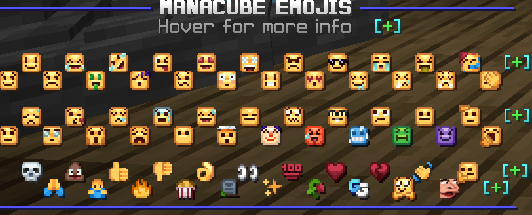
If you have VIP rank or above, you can use custom emojis in chat. Type /emojis to see the emojis available on ManaCube. Hover over an emoji to see its name, then type that name in chat using the :emoji: format.
These emojis are also available in our Discord server!
¶ Pins
Pins are small icons that appear next to your name in chat, above your head, and in the player list (tab). They are divided into three categories in the /pins menu:
- Country flags: Available in the Cubit Shop and Webstore.
- Generic pins: Obtainable randomly from Promotional Crates.
- Specialty pins: Obtainable through gameplay, Crates, bundles, festivals, and in-game shops.
Patrons receive a Crown pin, while a Heart pin can be unlocked through gifting.

Some pins can be customized by adding a hex code to change the color!
Flag Pins
¶ Americas Bundle
 USA
 Canada
 Brazil
 Colombia
 Argentina
 Peru
 Chile
 Bolivia
 Paraguay
 Uruguay
¶ Europe 1 Bundle
 Albania
 Belgium
 Denmark
 Finland
 France
 Germany
 Greece
 Italy
 Switzerland
¶ Europe 2 Bundle
 Netherlands
 Norway
 Portugal
 Spain
 Sweden
 UK
 England
 Scotland
 Ireland
 Wales
¶ Europe 3 Bundle
 Ukraine
 Lithuania
 Poland
 Romania
 Czech Republic
 Hungary
 Bulgaria
 Slovakia
 Croatia
¶ Asia 1 Bundle
 China
 Japan
 South Korea
 Indonesia
 Philippines
 Vietnam
 Thailand
 Malaysia
 Singapore
 Nepal
¶ Asia 2 Bundle
 India
 Pakistan
 Bangladesh
 Turkey
 Iran
 Iraq
 Saudi Arabia
 UAE
 Israel
¶ Oceania & Africa Bundle
 Australia
 New Zealand
 South Africa
 Egypt
 Morocco
 Algeria
Generic Pins
 Berry
 Bone
 Book
 Candy
 Claw
 Cookie
 Diamond
 Eaten Apple
 Feather
 Frog
 Glasses
 Ice Cream
 Impostor
 Key
 Leaf
 Leek
 Medal
 Mushroom
¶ Nicknames
If you have the VIP rank, you can nickname yourself using /nick! Default Minecraft /colors codes can be used to customize your name, and players with Elite rank can also use custom hex colors.
Unlock the Bold/Italics perk from Legendary Crates to use &l and &o formatting codes.

You can use multiple color codes, but make sure to place them before other formatting codes.
For example, /nick &d&lKr&a&listi&b&lna would result in  .
NOTE: Visible nicknames must be at least 2 characters long and cannot use Underline, Strikethrough, or Magic Font. Names must be unique from other players' and staff members' names to avoid impersonation. Inappropriate, disrespectful, or otherwise rule-breaking nicknames are not allowed.
¶ Prefixes
Players with MVP+ or higher, Patron, or Mapper can customize their prefix using /prefix. Prefixes can be set individually in each realm and appear in chat, above your head, and in the player list (Tab). Your profile displays your highest rank.
The GUIs and prefixes vary between 1.16+ and 1.8.


¶ 1.16+
Change the “+” color to cyan, grey, green, lime, orange, purple, red, white, or yellow.


¶ 1.8
Change the “+” color to orange, pink, light blue, yellow, green, purple, or white.


¶ 1.16+
Change the whole prefix color to cyan, grey, green, lime, orange, purple, red, white, or yellow.


The rainbow, sunset, and clouds styles can be won from the Elite Crate.


 The dark orange prefix was obtainable during the 2023 Halloween Festival.
 Give other players gifts worth 150 Cubits to unlock the royal prefix.
¶ 1.8
Change the whole prefix color to cyan, purple, red, orange, yellow, green, or white.


The dark green, grey, rainbow, sunset, and dusk styles can be won from the Elite Crate.


 The dark orange prefix was obtainable during the 2023 Halloween Festival.
 Give other players gifts worth 150 Cubits to unlock the royal prefix.
¶ 1.16+
The default Patron and Patron+ prefixes are green. On newer realms, you can change it to a custom hex color.


¶ 1.8


¶ Mappers
Players with the Mapper rank can use the purple Mapper prefixes and access other rank perks.



Completing all Parkour courses awards a checkmark displayed beside your name and donator rank. Its color depends on the mode and season in which you completed the maps.

If new courses are added, you must complete them to keep your checkmark. Otherwise, it will disappear until you finish the new maps.
¶ Content Creators
Previously, players who met the requirements could have a Streamer/Twitch, YouTuber, or Creator prefix. This was later updated to the Media rank.




¶ Team Members
Applications for the Quality Assurance team open periodically. Builders are usually hand selected.


¶ Retired Staff
Former staff members may receive the Retired prefix upon retirement.


¶ Titles
Titles appear in front of your name when you send messages in chat. They can be obtained in a variety of ways, including boss drops (/loot), tasks and challenges (/quests), Crates (/crates), Events, and more. View and equip them with /titles or /tags.
Search and sort the available titles in this title list.

¶ Chat Colors
Bored with your standard white text, or looking for a way to stand out in chat? Customize your text color with /chatcolors! Chat colors can be unlocked from Crates, limited-time Events, and sometimes bundles and passes. Realms on 1.8 often have simplified versions of these colors.

You can reset your chat color to the default by clicking the barrier, or filter the list to show only unlocked colors by clicking the hopper.

Depending on the realm, the Patron rank also unlocks a green or red chat color.
¶ Join & Quit Messages
Alert players to your arrival and departure from a realm with /joinmessages and /quitmessages! A few are unlocked with ranks, while others can be obtained from Crates (/crates), Events, shops, and more.


Free Rank Join Messages
¶ Elite
 [IGN] has joined the server
- [IGN] has arrived. Seems OP - pls nerf
- [IGN] has joined and nobody cares.
- [IGN] just slid into the server.
¶ Patron
- Roll out the red carpet, [IGN] is here!
- [IGN] is here to make it rain!
Psst, I wonder what /ragequit does?